
Excel to MYSQL4.1 - Download
You'll be able to download in few seconds.
Publisher Description
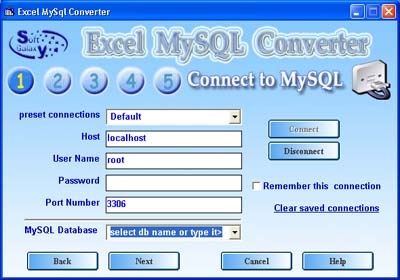
Excel-MySQL is an automation tool that can convert any MySql database into MS Excel spreadsheets or convert any Microsoft Excel spreadsheets into MySQL database , utilizing easy to use Wizard style interface, Just follow the simple screens and let the wizard automatically do all the work .. Along with general functionality - data importing / exporting- the wizard allows you to store your data to PHP script to be able to import your Excel file to MySQL even if remote connection to the target MySQL server is not allowed. All versions of MS Excel are supported , Works with all versions of Unix and Windows MySQL servers ,Supports both local and remote connections to MySQL server, Support for scheduling conversion tasks to be performed automatically,You can choose either to convert to a new database, overwrite an existing one or append your tables to an existing database ,the ability to select only the tables you want convert,The ability to select only the columns you want to convert from each selected table ,Ability to append new records in an already existing tables,You can choose either to convert to a new database, overwrite an existing one or append your tables to an existing database,Splitting Mysql tables which is containing more than 65535 records into Multiple Excel spreadsheets ,Ability to remember the connection parameters ,Command line support,Support for saving MySQL connection data so you don't have to enter them each time you run the wizard,Full install/uninstall support ,and so many advanced features This useful tool can save you tons of your valuable time , and is suitable for both beginners and experienced users alike
About Excel to MYSQL
This Databases & Tools program is available in English. It was last updated on 29 September, 2026. Excel to MYSQL is compatible with the following operating systems: Linux, Other, Unix, Windows.
The company that develops Excel to MYSQL is softgalaxy. The latest version released by its developer is 4.1.
The download we have available for Excel to MYSQL has a file size of 3.1 MB. Just click the green Download button above to start the downloading process. The program is listed on our website since 2011-01-06 and was downloaded 0 times. We have already checked if the download link is safe, however for your own protection we recommend that you scan the downloaded software with your antivirus. Your antivirus may detect the Excel to MYSQL as malware if the download link is broken.
How to install Excel to MYSQL on your Windows device:
- Click on the Download button on our website. This will start the download from the website of the developer.
- Once the Excel to MYSQL is downloaded click on it to start the setup process (assuming you are on a desktop computer).
- When the installation is finished you should be able to see and run the program.
Program Details
System requirements
Download information
Pricing
Version History
version 4.1
posted on 2011-01-06
Scheduling of the conversion tasks to be performed automatically. .
version 2.1
posted on 2003-09-29
Disclaimer
External Download
We do not host Excel to MYSQL on our servers. We did not scan it for viruses, adware, spyware or other type of malware. This app is hosted by the software publisher and passed their terms and conditions to be listed there. We recommend caution when installing it.
The external download link for Excel to MYSQL is provided to you by apps112.com without any warranties, representations or guarantees of any kind, so access it at your own risk.
If you have questions regarding this particular app contact the publisher directly. For questions about the functionalities of apps112.com contact us.
